LibreCorsa download and platforms
Last checked: · launcher v0.3.0 · Android v0.2.2
Play in any modern browser at librecorsa.org/play, or install the desktop launcher 0.3.0 (Windows, macOS, Linux) or the signed Android app 0.2.2. There is no Steam version and no PlayStation or Xbox version. This page does not host installers; every link goes to librecorsa.org or GitHub Releases.
Which version should you use?
| Platform | What you get | Version · date | Size | Works offline? | Catch |
|---|---|---|---|---|---|
| Browser | librecorsa.org/play, nothing to install | Updates with the site | — | No — online browser launch required | Needs WebGL2 and hardware acceleration |
| Windows x64 | Desktop launcher, .zip | 0.3.0 · 27 Nov 2026 | 58 MB | Yes | Unsigned: SmartScreen → More info → Run anyway |
| macOS (Apple silicon and Intel) | Desktop launcher, .dmg or .zip | 0.3.0 · 27 Nov 2026 | DMG ≈60 MB; ZIP ≈58 MB | Yes | Not notarised: System Settings → Privacy & Security → Open Anyway |
| Linux x64 | Desktop launcher, .tar.gz | 0.3.0 · 27 Nov 2026 | 57 MB | Yes | Unpack and run librecorsa; it adds itself to the app menu on first start |
| Android 7+ | Signed APK, a full-screen shell for the website | 0.2.2 · 23 Nov 2026 | 1.3 MB | No, it loads librecorsa.org/play | Needs Chrome and a connection |
| iPhone / iPad | Safari → Share → Add to Home Screen | Updates with the site | — | No | Home-screen saves are kept apart from Safari saves |
| VR headsets | WebXR from the browser | Experimental | — | No | See the VR guide |
| Steam, PS4/PS5, Xbox | Nothing | — | — | — | The developer has “no plans right now” |
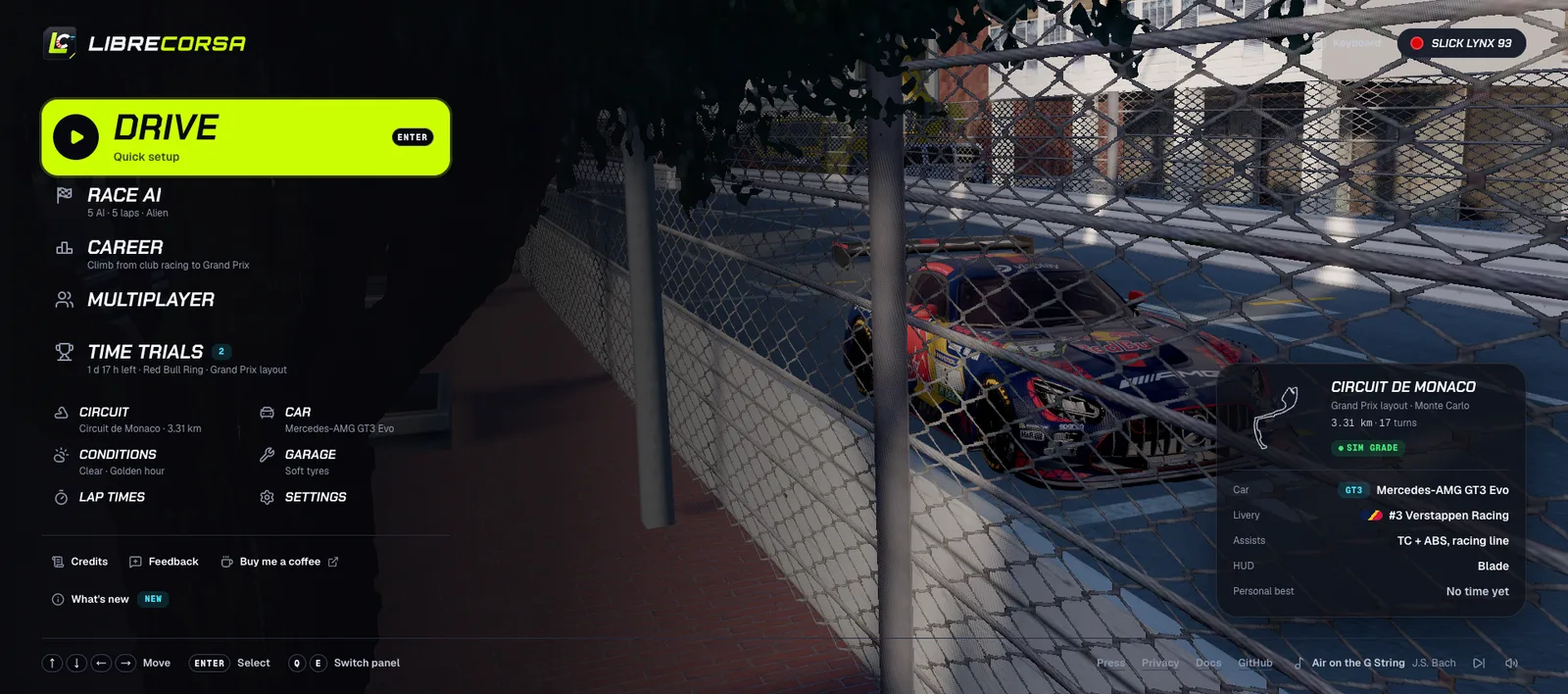
The desktop launcher (0.3.0)
The launcher released on 27 November 2026 carries the game inside the app, so it runs from your own disk without a connection. Cars and circuits you have loaded once stay available. It is also the only place mods load: drop a package into Documents/LibreCorsa/mods or import a .zip in the Mods panel. The mods guide covers what packages may contain.
Code signing for Windows is coming through the SignPath Foundation, but on 28 Nov 2026 it was not live yet, so Windows warns on first run. Keep the folder out of Program Files so the launcher can update itself.
- Open librecorsa.org/download or GitHub Releases and pick the file for your system.
- Windows: unzip to a folder you own, run the app, then choose More info → Run anyway on the SmartScreen prompt.
- macOS: open the
.dmg, drag the app across, start it once, then allow it under System Settings → Privacy & Security → Open Anyway. - Linux: unpack the
.tar.gzand runlibrecorsa.
The Android APK (0.2.2)
Search results that say “there is no APK” are out of date. The Android app has been on the download page since 23 November 2026. It is small because it is a signed full-screen shell (a Trusted Web Activity) around librecorsa.org/play: it needs Chrome on the phone and a working connection, and it gets new features the moment the website does. The signature is checked against the site’s assetlinks.json.
Phones run the game on the Medium preset with automatic quality on. If it gets hot, the performance guide explains the 30 fps cap.
Third-party “APK mod” files
Files called “LibreCorsa APK mod” or “unlocked” on mirror sites are not made by the developer. There is nothing to unlock, because the game has no paid content, so a modified package offers nothing except risk. Take the APK from librecorsa.org or GitHub Releases only.
Old download advice
Common outdated claims
- There is no Android APK.
- A signed APK, 0.2.2, has been on the download page since 23 Nov 2026. See the change log.
- LibreCorsa is browser-only, nothing to download.
- The browser is still the main way in, but desktop apps for three systems and an Android app exist. See the change log.
- Play it at khazp.github.io/librecorsa.
- That address returned 404 for every path I tried on 28 Nov 2026. Use librecorsa.org. See the change log.
FAQ
Is LibreCorsa on Steam?
No. The developer’s FAQ says there are no plans for Steam or consoles right now. Steam is only used as one of the optional sign-in methods.
Can I play LibreCorsa offline?
Yes, with the desktop launcher 0.3.0. The browser version caches what you have downloaded but cannot run fully offline, and the Android app always needs a connection.
Why does Windows warn me about the installer?
The Windows build is not code-signed yet; signing through the SignPath Foundation was still being set up on 28 Nov 2026. Download only from librecorsa.org or GitHub Releases.
Do I need an account to download or play?
No. Accounts are optional and only sync your profile and times across devices.
Sources
Checked 28 November 2026. Project website, docs and GitHub are one developer source; multiple project references do not count as independent confirmation.
- librecorsa.org download page: version numbers, dates, file sizes and install notes per platform; read 28 Nov 2026
- GitHub Releases: launcher-v0.3.0 (27 Nov 2026) and desktop-v0.2.2 (22 Nov 2026 UTC); read 28 Nov 2026
- LibreCorsa docs: Desktop and Android apps: what the launcher and the Android app do; read 28 Nov 2026
- LibreCorsa docs: FAQ: price, platforms, Steam and consoles, Discord, licences, why some circuits are missing; read 28 Nov 2026
- LibreCorsa docs: Performance: requirements, quality presets, automatic quality, black screen messages, cache; read 28 Nov 2026
- Old GitHub Pages address: returned 404 for every path tried on 28 Nov 2026