Playing LibreCorsa in VR
Last checked: · launcher v0.3.0 · Android v0.2.2
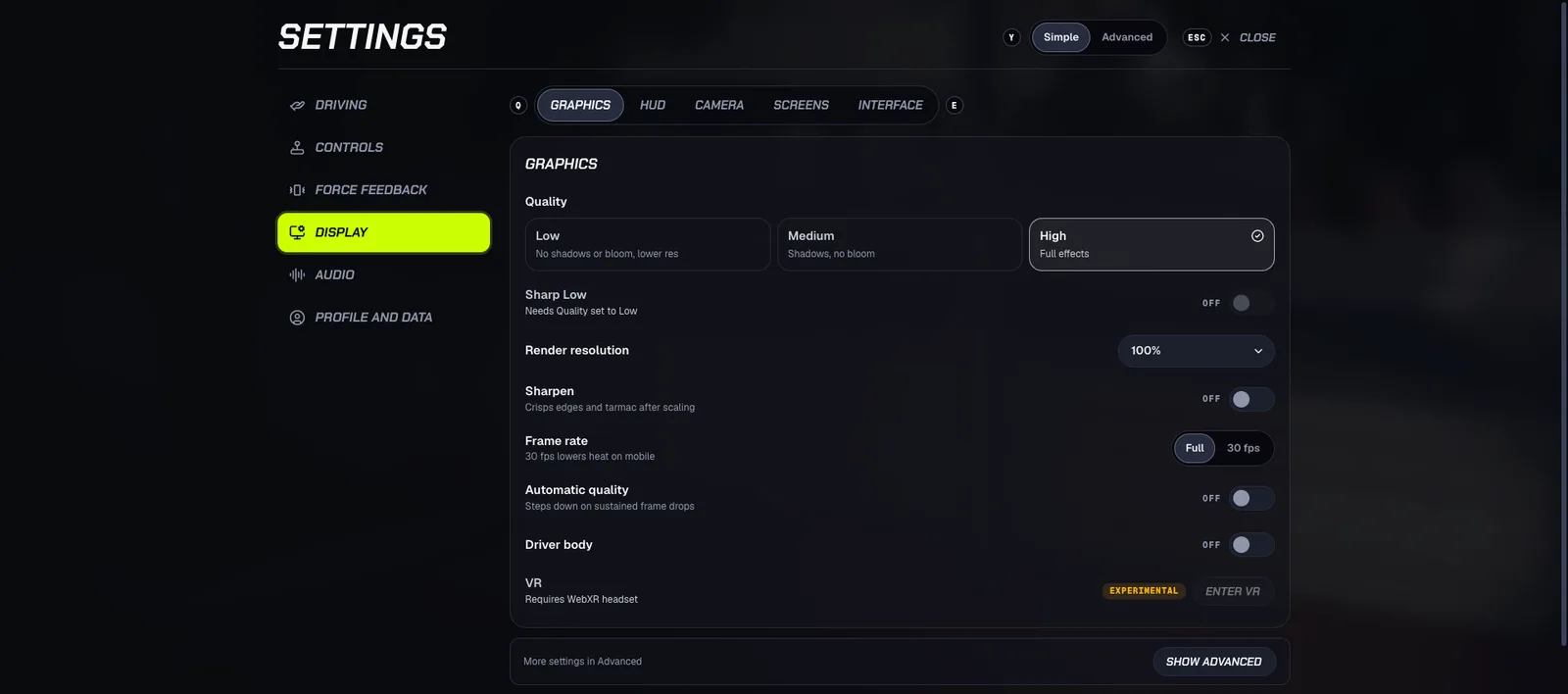
Yes, LibreCorsa has experimental VR through WebXR, added on 27 Nov 2026. Load a circuit on the normal page first, then choose Settings → Display → Graphics → VR → Enter VR (or use the pause menu). Quest 2, 3 and 3S, Pico and Wolvic run it standalone; PC VR needs Chrome or Edge with OpenXR.
How to enter VR
- Open librecorsa.org/play over HTTPS in your headset’s browser (Quest Browser, Pico Browser or Wolvic), or in Chrome or Edge on a PC with your headset connected through OpenXR.
- Pick a circuit and car and let it load on the flat page.
- Go to Settings → Display → Graphics, find VR and press Enter VR. You can also enter from the pause menu.
- Drive from the cockpit view. While paused, press Y to re-centre and B to leave VR. Menus stay on the flat page.
Which headsets work
| Setup | Browser | Notes |
|---|---|---|
| Meta Quest 2 / 3 / 3S (standalone) | Quest Browser | Detected as a mobile GPU; quality drops to suit it |
| Pico (standalone) | Pico Browser | Same mobile-class handling |
| Wolvic | Wolvic | Listed as supported |
| PC VR: SteamVR, Quest Link / Air Link, Virtual Desktop, WMR | Chrome, Edge, Brave or Chromium | Needs an OpenXR runtime |
| Any headset over plain HTTP | — | Shows “Requires WebXR headset”; WebXR needs HTTPS or localhost |
Defaults and limits
- Quality starts at Medium with automatic quality on, 72 Hz where the headset supports it, fixed foveation 0.5 and 4× MSAA on the eye buffers.
- The HUD becomes four 3D panels: gear and speed on the left, position and lap times on the right, start lights above the nose, and status in the middle.
- Bloom, sharpening and raindrop effects are off in VR. Triple screens and touch controls are switched off, and the 30 fps cap does nothing.
- Only the cockpit camera is available. If the GPU is lost, the game leaves VR on its own.
Out-of-date VR claims
Common outdated claims
- LibreCorsa does not support VR.
- WebXR VR arrived with the 27 Nov 2026 update, marked experimental. See the change log.
- You need SteamVR.
- Standalone Quest and Pico headsets run it in their own browsers. SteamVR is one of several PC VR options.
FAQ
Does LibreCorsa work on Quest 3?
Yes, in the Quest Browser. The developer marks VR as experimental and says the standalone fixes were tested on an emulated Quest 3.
Why is the Enter VR button greyed out?
Your browser has no WebXR headset available, or the page is not on HTTPS. Use Quest Browser, Pico Browser, Wolvic, or Chrome/Edge with OpenXR running.
Can I use VR with triple screens?
No. Entering VR switches triple screens off. See Telemetry and triple screens.
Sources
Checked 28 November 2026. Project website, docs and GitHub are one developer source; multiple project references do not count as independent confirmation.
- LibreCorsa docs: VR: WebXR headsets, entering VR, limits; read 28 Nov 2026
- GitHub repository librecorsa/librecorsa: README car and circuit tables, hardware table, licence, physics verification; read 28 Nov 2026
- librecorsa.org home page and What’s new list: game description, circuit and car lists, the dated change log; read 28 Nov 2026